Website localisation is no longer a nice-to-have for enterprises and government bodies. As more users shift to digital services in their own languages, localisation has become a strategic advantage for scale, trust, and user adoption. A recent study shows that 76 per cent of consumers prefer buying from websites that present information in their native language.
This preference is even stronger in multilingual markets like India, where digital users expect platforms to speak their language with accuracy and cultural relevance. You already know how critical user trust is in sectors like banking, citizen services, healthcare, and eCommerce. When users cannot understand content clearly, they abandon tasks, drop off during transactions, or mistrust the service.
Effective website localisation solves this by making your platform accessible, compliant, and user-friendly across regions. In this guide, you will learn a complete framework for website localisation and how to execute it successfully.
Key Takeaways
- website localisation improves usability, trust, and task completion for regional audiences across India.
- Localisation goes beyond translation and requires cultural, UX, and technical adaptation across every digital touchpoint.
- A strong framework includes content extraction, terminology control, UI adjustments, testing, and continuous quality management.
- Success depends on tracking behaviour, completion rates, accessibility metrics, and regional adoption patterns.
- Anuvadak enables scalable, secure, and automated localisation so you can deliver multilingual experiences with consistency and speed.
What Is Website Localisation and How Is It Different From Translation?
Website localisation is the process of shaping your digital experience so it feels natural, intuitive, and culturally aligned for every language audience you serve. Translation focuses on converting text from one language to another, but localisation ensures your entire website works for users who think, browse, and interpret information differently across regions.
Below are the key differences you should consider.
- Purpose and Depth: Translation converts words. Localisation adapts intent, structure, and flow so users can complete tasks confidently. For example, a loan application flow in BFSI must communicate risk disclosures in a language that matches local reading patterns.
- Cultural Fit: You align your content with local norms, tone, and user expectations. A phrase that works in English may sound formal or unclear in Marathi or Tamil, which affects how users engage with your platform.
- Technical Adaptation: You modify UI behaviour, font rendering, text expansion, and input formats. This is critical for websites with transaction forms, dashboards, or search interfaces that need region-specific usability.
- Operational Control: You manage glossaries, style rules, and review workflows to ensure consistency across teams and product surfaces. This keeps your brand’s Localisation terminology accurate across languages and channels.
Also Read: Voice AI in Consumer Electronics: Redefining Customer Experience
Understanding this distinction is essential for building strong website localisation frameworks, especially for teams following best practices shared in leading website localisation blogs.
What Are the Core Components of a Website Localisation Framework?
A strong localisation framework helps you manage multilingual experiences with precision, speed, and governance. As your website grows, fragmented translation efforts can create inconsistencies, quality gaps, and compliance risks.
Below is how you can break down a localisation framework into clear, workable components.
Content Extraction and Source Content Quality
You cannot build a reliable localisation workflow without clean, structured source content. The quality of what you extract directly influences translation accuracy, review time, and user experience. If your website content sits across multiple templates, dynamic widgets, or custom components, you need a method that captures every translatable asset without breaking functionality.
Below are the elements you should focus on.
- Identify All Translatable Elements: You capture navigation labels, error messages, form inputs, microcopy, and dynamic content blocks through systematic extraction. For example, eCommerce filters and category labels often sit outside the CMS and must be included manually.
- Create Clear Source Content Structures: You keep content modular and separated from code. This ensures your engineering and localisation workflows remain aligned when pages evolve or new modules launch.
- Improve Readability Before Localising: You refine wording, remove ambiguities, and eliminate repetitive phrasing. Cleaner source text reduces interpretation gaps for translators and improves the final regional experience.
- Standardise Terminology At The Source: You define key product, service, or process terms upfront. This helps automated systems and human reviewers maintain consistency across all output languages.
Cultural Adaptation and Contextual Rewriting
When you localise content for diverse Indian audiences, direct equivalents often fail to capture tone, meaning, or intent. Users across regions have different reading patterns, emotional cues, and decision triggers. This makes cultural adaptation a core part of your localisation strategy.
Below are the areas you should focus on.
- Adapt Messaging For Local Mindsets: You shape wording to suit how users interpret information. For instance, healthcare guidance may need softer phrasing in Bengali but more direct clarity in Malayalam.
- Reframe Examples And Scenarios: You replace references that feel distant with locally familiar contexts. A financial savings example using international benchmarks can be rewritten using region-specific income patterns.
- Align Tone With Regional Preferences: You adjust the tone so it feels natural to each audience. Some languages respond better to formal structures while others prefer conversational phrasing.
- Resolve Cultural Sensitivities Early: You check for phrases or visuals that may feel misleading or insensitive in specific regions. Early contextual reviews prevent future escalations.
Terminology Control, Glossaries, and Style Guides
When you scale localisation across multiple teams and product surfaces, terminology becomes one of your biggest risks. Inconsistent wording confuses users, affects regulatory clarity, and weakens the reliability of your digital experience. A structured terminology system helps you protect accuracy while speeding up translation cycles.
Below are the elements you should formalise.
- Create A Master Terminology List: You identify product names, process terms, compliance labels, and high-frequency phrases. For example, BFSI journeys often reuse the same risk terms across multiple flows, which must remain uniform.
- Build Language Specific Glossaries: You define preferred translations, rejected alternatives, and usage notes for each target language. This gives your reviewers and automation tools clear direction.
- Develop A Style Guide for Each Language: You set rules for tone, punctuation, sentence structure, and formatting preferences. This keeps your multilingual content consistent even when different writers are involved.
- Maintain Version Control For All Linguistic Assets: You track updates to terms, glossary entries, and style documents. This prevents outdated language from reappearing in new content.
UX and UI Adjustments for Local Languages
Once you introduce new languages into your website, you often see shifts in layout behaviour, content flow, and user interaction patterns. Indian scripts vary in length, structure, and visual density, which means your design must adapt without compromising usability.
Below are the areas you should refine.
- Accommodate Script Dimensions: You evaluate how each script affects spacing, line breaks, and readability. For instance, Gujarati and Telugu characters often require more vertical space than English.
- Refine Navigation Patterns: You adjust menu labels, dropdown widths, and icon spacing so users can scan and select options comfortably in their preferred language.
- Redesign Key Interaction Elements: You optimise buttons, form fields, and alert components to handle content expansion. This reduces friction for users completing tasks on transactional pages.
- Support Region Specific Layout Behaviours: You ensure responsive templates can adapt to languages with different structural demands. This prevents layout shifts that may confuse or slow down users.
Scaling multilingual UI across diverse Indian scripts becomes far easier when you work with the right localisation system. Discover how Anuvadak helps you build Website Localisation that stays consistent, stable, and user-friendly across every language.
Testing and Validation
After your content and interfaces are localised, you need a structured testing phase to ensure every language version performs reliably. Localisation often introduces behaviour that does not appear in the source language, which means errors can surface only after deployment.
Below are the checkpoints you should include.
- Validate Language Accuracy In Context: You review translated text within actual screens, ensuring clarity in forms, dashboards, and interactive modules.
- Check System Behaviour Across Languages: You test navigation, search, and input handling to confirm that language-specific content loads without breaking functionality.
- Run Visual Consistency Reviews: You inspect alignment, spacing, and line wrapping issues in every layout so each version feels polished and dependable.
- Simulate Real User Journeys: You complete end-to-end tasks in each language to confirm that users can navigate, understand, and finish key actions without confusion.
Also Read: Top 10 Voice Cloning APIs for Developers in 2025
Knowing these core components provides the foundation you need to plan and execute a successful website localisation project.
How to Plan and Execute a Website Localisation Project?
A successful localisation project depends on clear planning across content, design, engineering, and quality teams. Without a defined execution path, you risk delays, inconsistent outputs, and rework across multiple languages. As someone driving digital transformation or product delivery, you need a plan that aligns priorities, automates repetitive tasks, and ensures predictable release cycles.
Below are the steps that help you manage execution effectively.
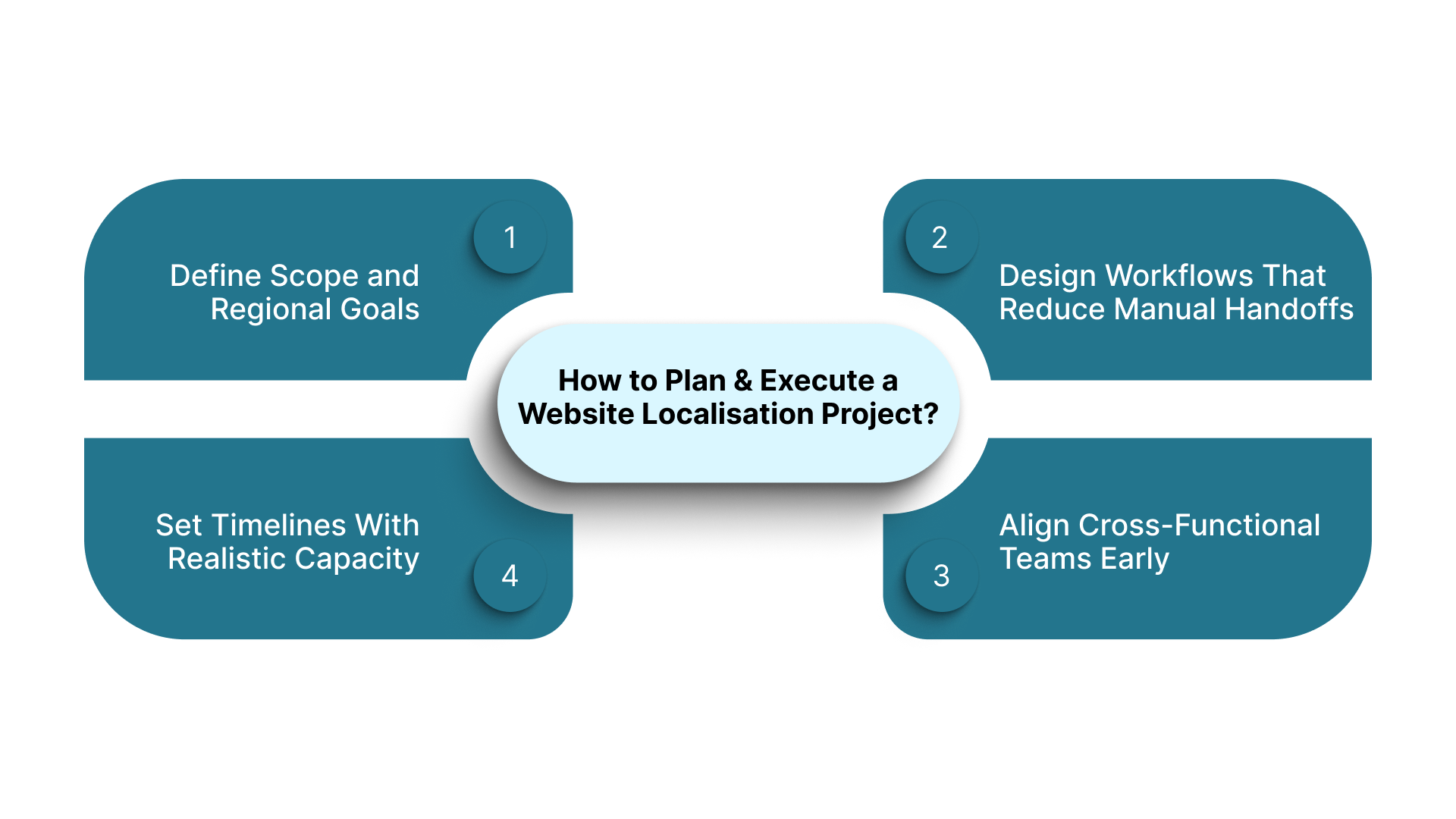
- Define Scope and Regional Goals: You identify which pages, workflows, and product areas matter most for your target languages. For instance, BFSI onboarding journeys may take priority in markets with high regional adoption.
- Design Workflows That Reduce Manual Handoffs: You configure automated pipelines that move content between translation, review, and deployment, lowering the risk of version mismatches.
- Align Cross-Functional Teams Early: You bring product, engineering, design, and localisation teams together to agree on responsibilities, review cycles, and release timings.
- Set Timelines With Realistic Capacity Estimates: You map workload, language load, and review bandwidth to a feasible schedule so your launches remain predictable.
It is now time to see how to optimise user experience for localised websites.
How to Optimise User Experience for Localised Websites?
A localised website succeeds only when users can navigate it naturally and complete tasks without friction. Language alone cannot guarantee this. You must account for how different regions interpret layouts, scan information, and interact with controls. As someone responsible for product performance or service delivery, you need a UX strategy that adapts to behavioural patterns across markets.
Below are the experience factors you should refine.
- Tailor Navigation To Regional Reading Patterns: You adjust menu depth, grouping, and sequence to match how local audiences search for information. For example, government service users may expect category-based navigation instead of topic-based paths.
- Plan for Content Flow Variations: You test how different scripts influence line breaks, alignment, and scanning behaviour. This helps your pages remain easy to browse, even when text density changes.
- Strengthen Accessibility Support: You include screen reader compatibility, clear focus states, and high contrast layouts. These practices help you meet regulatory requirements and improve usability for diverse user groups.
- Tune Micro Interactions For Local Habits: You refine button labels, tooltips, and confirmation messages so they guide users through complex tasks like applications or transactions.
Optimising user experience is only complete when you follow it with thorough testing, validation, and ongoing maintenance for your localised website.
How to Test, Validate, and Maintain a Localised Website?
Once your multilingual website goes live, the real challenge begins. Languages evolve, regulations shift, and product teams release updates that can disrupt existing translations. You need a maintenance approach that keeps every language version accurate, stable, and aligned with user expectations.
Below are the areas you should prioritise.
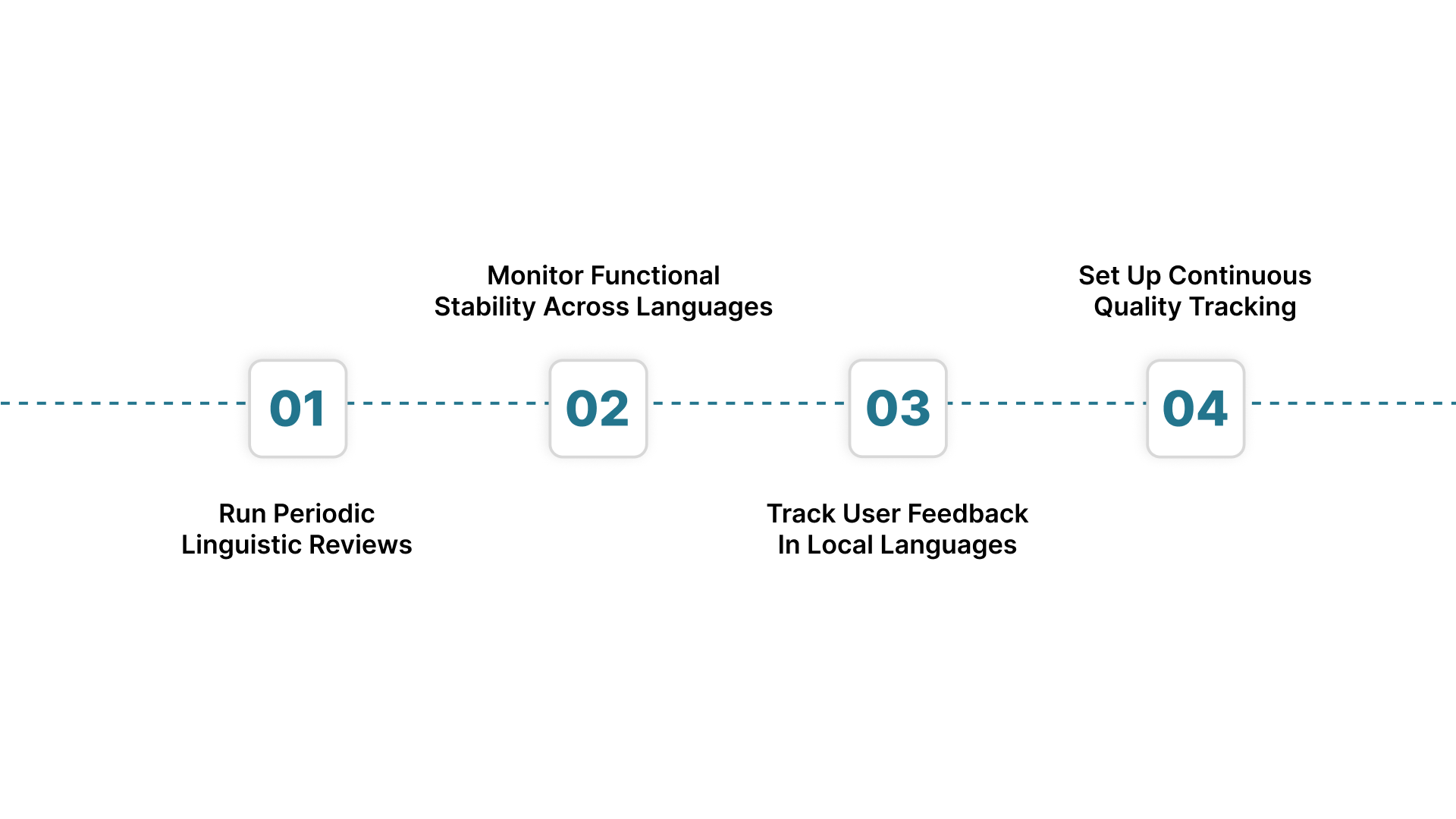
- Run Periodic Linguistic Reviews: You schedule audits that refresh terminology, update phrasing, and remove outdated references. This is critical when you introduce new product features or revise policy content.
- Monitor Functional Stability Across Languages: You test interactive elements after each release cycle to confirm that new code has not affected layouts, redirects, or content loading for regional versions.
- Track User Feedback In Local Languages: You capture comments from support tickets, chatbots, or analytics dashboards to detect friction points that your teams may not see during internal testing.
- Set Up Continuous Quality Tracking: You use monitoring tools that flag untranslated strings, broken layouts, and missing assets. This lets you fix issues before users notice them.
Your multilingual experience deserves continuous accuracy, not last-minute fixes. Strengthen your release cycles with Anuvadak and streamline App Localisation across all platforms.
Also Read: Why Insurers Are Tuning In to These Best AI Voice Agents
Now, let us have a look at a clear and reliable pre-launch and post-launch localisation checklist.
A Pre-Launch and Post-Launch Localisation Checklist
A localisation project is only as strong as the checks you run before and after release. Even well-translated content can fail if layouts, integrations, or review cycles are not verified thoroughly. A structured approach reduces launch risks and ensures your regional audiences receive a seamless experience from day one.
Below are the checkpoints you should verify.
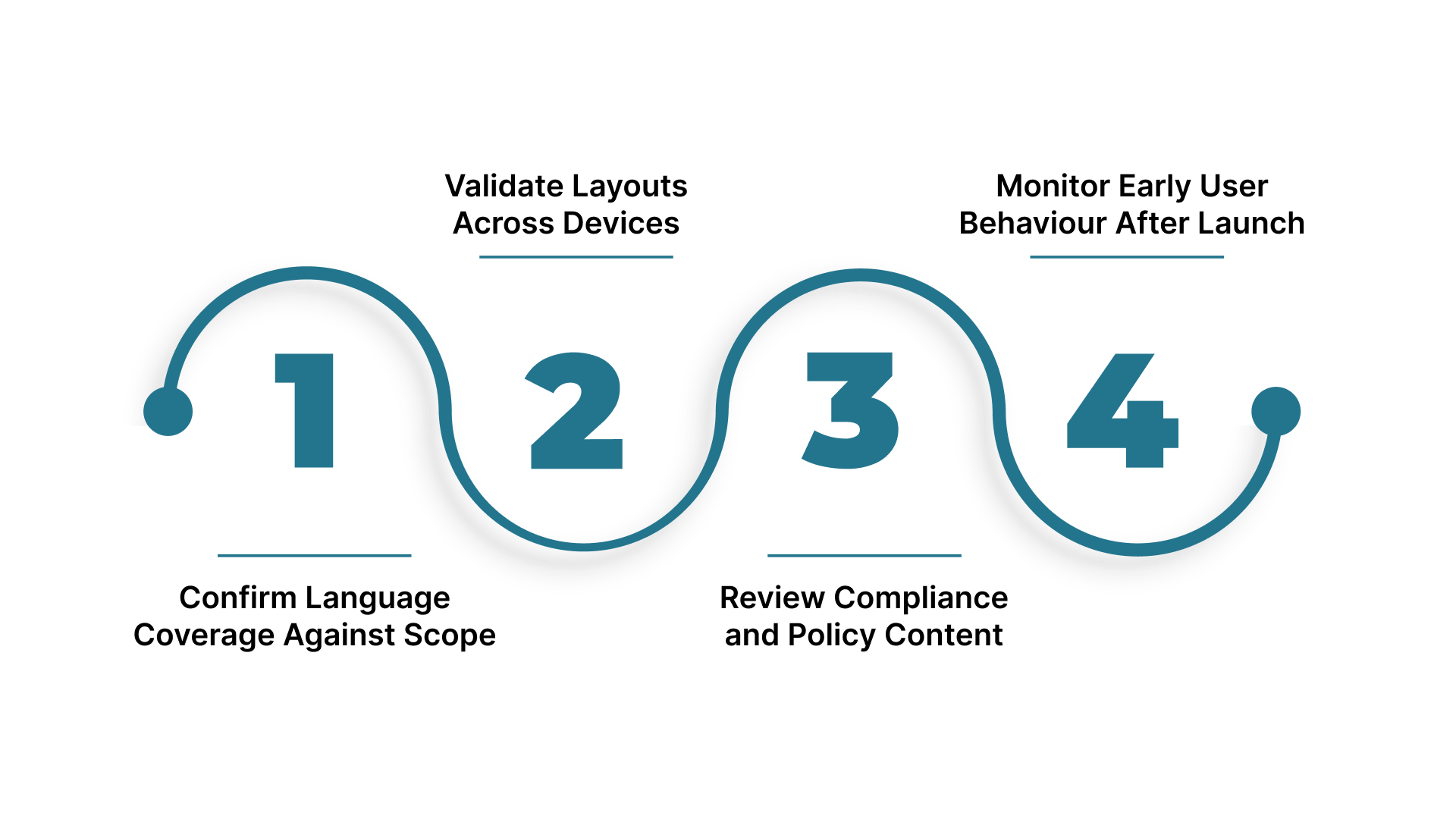
- Confirm Language Coverage Against Scope: You ensure every planned page, form, and workflow is fully localised. This eliminates gaps that could disrupt user journeys at launch.
- Validate Layouts Across Devices: You check responsiveness for mobile, tablet, and desktop to confirm that each script renders cleanly in different breakpoints.
- Review Compliance and Policy Content: You verify that regulatory language aligns with updated guidelines for each region. This is crucial for sectors like finance and healthcare.
- Monitor Early User Behaviour After Launch: You track usage patterns to identify points where users slow down or seek support. Early insights help you adjust content or UI elements quickly.
Following a thorough pre-launch and post-launch checklist sets the stage for exploring how Anuvadak helps enterprises and government teams localise websites at scale.
How Anuvadak Helps Enterprises and Government Teams Localise Websites at Scale
Anuvadak gives you a structured, automated, and secure way to manage multilingual websites across large digital ecosystems. Instead of handling translations through scattered tools and manual processes, you work with a single platform that aligns content workflows, linguistic accuracy, and technology integration.
Below are the ways Anuvadak supports your localisation goals at scale.
- End Website and App Localisation: Anuvadak extracts content directly from your website, translates it with AI-backed workflows, and publishes localised versions without disrupting your codebase. This helps you update pages, banners, forms, and microcopy in multiple languages with minimal engineering effort.
- Centralised Content Management: You manage all languages from a single dashboard. When your teams update source content, Anuvadak automatically identifies changes, routes them for translation, and keeps every language version aligned. This avoids missed updates and out-of-sync pages.
- Translation Memory and Glossary Control: Anuvadak stores approved terms and previous translations so your content stays consistent across regions. This is especially valuable for regulated sectors where terminology cannot vary across languages or journeys.
- AI-Powered Translation with Human Review Support: You use machine translation for speed and add human refinement where accuracy is critical. This hybrid approach helps you manage large volumes without compromising quality.
- CMS and API Integrations: Anuvadak connects with your existing CMS or custom platforms, allowing you to push and pull multilingual content automatically. This removes repeated manual uploads and reduces dependency on engineering teams.
- Security and Compliance Controls: Anuvadak uses encryption, role-based access, and secure workflows that meet enterprise and government standards. This keeps sensitive content protected throughout your localisation lifecycle.
This helps you release updates faster, maintain consistency, and support regional audiences with confidence.
Conclusion
Website localisation is now central to delivering trustworthy and accessible digital services across India. When your content, design, and workflows adapt to the expectations of regional audiences, you improve adoption, reduce friction, and strengthen long-term user engagement.
If you want your multilingual website to scale without complexity, Anuvadak gives you the automation, accuracy, and control needed to achieve it.
Explore how Anuvadak can accelerate your localisation strategy. If you are ready to implement enterprise-level localisation and do not want your competitors to reach regional audiences before you, get in touch with the Anuvadak team today!
FAQs
1. What is the difference between website localisation and internationalisation?
Internationalisation prepares your website architecture to support multiple languages without code changes. Localisation adapts the content, visuals, and user experience for each target language. You set up internationalisation first, so localisation becomes faster, scalable, and easier to maintain as you expand into new regional markets.
2. How long does a typical website localisation project take for large enterprises?
Timelines depend on content volume, number of languages, review cycles, and integration complexity. Large enterprise projects often take several weeks for initial rollout, followed by ongoing updates.
3. What skills do you need in a localisation team for enterprise-scale projects?
You need linguists, reviewers, UX specialists, engineers, and project managers who understand multilingual workflows. Each role ensures linguistic accuracy, functional stability, and smooth deployment.
4. How much does website localisation cost, and what factors influence pricing?
Costs depend on language count, content complexity, volume, review requirements, and technology used. Transactional websites, regulatory content, and high-frequency updates increase effort.
5. Can localisation improve SEO performance for regional markets?
Yes. Search engines prioritise content that matches user language preferences. Localised metadata, URLs, structured content, and culturally aligned keywords improve visibility for regional audiences.

