OpenAI’s Realtime API has changed how teams think about live voice. It lets you stream audio and receive text or responses almost instantly.
For many developers, it feels like the easiest way to build real-time voice experiences.
But enterprise transcription is a different story. Real calls include noise. Users switch languages mid-sentence. Accents vary widely. Volumes are high.
These conditions are common in India, and they push real-time systems far beyond clean demo audio.
This guide breaks down how the Realtime API works, how to build with it and what teams should consider before using it for live transcription at scale.
At a Glance
- OpenAI’s Realtime API streams audio with low latency and provides instant text or voice output for live conversational experiences.
- Its transcription works through WebSocket streaming with partial and final text events generated in real time.
- Setup requires live audio capture, frame encoding and event handling, which increases engineering effort.
- The Realtime API is not optimised for Indian languages, code-switching, telephony audio or on-prem compliance needs.
- Reverie’s Speech-to-Text API offers accurate multilingual transcription across 11 Indian languages, supports noisy real-world audio and provides flexible cloud or on-prem deployment for enterprise use.
What Is OpenAI’s Realtime API?
OpenAI’s Realtime API is a low-latency streaming interface that lets your application send audio in and receive text or audio responses almost instantly. It works with audio, text and image inputs, and can return both speech and text outputs.
The API is built for interactive voice experiences. Product teams use it to create voice agents, assistants and conversational interfaces that respond in real time.
It supports different connection methods based on your tech stack:
- WebRTC for browser-based voice agents
- WebSocket for server-side applications
- SIP for telephony and VoIP integrations
This flexibility makes it easy to add live voice features to apps, websites or phone systems.
OpenAI also provides a TypeScript Agents SDK. It handles microphone access, audio playback and session management, so teams can prototype voice agents quickly.
The Realtime API can also deliver live transcription. You can stream audio over a WebSocket connection and receive text output as the user speaks.
In short, the Realtime API is a single pipeline for listening, understanding and responding in real time, making it useful for any product experimenting with live voice interactions.
How the Realtime API Handles Live Transcription
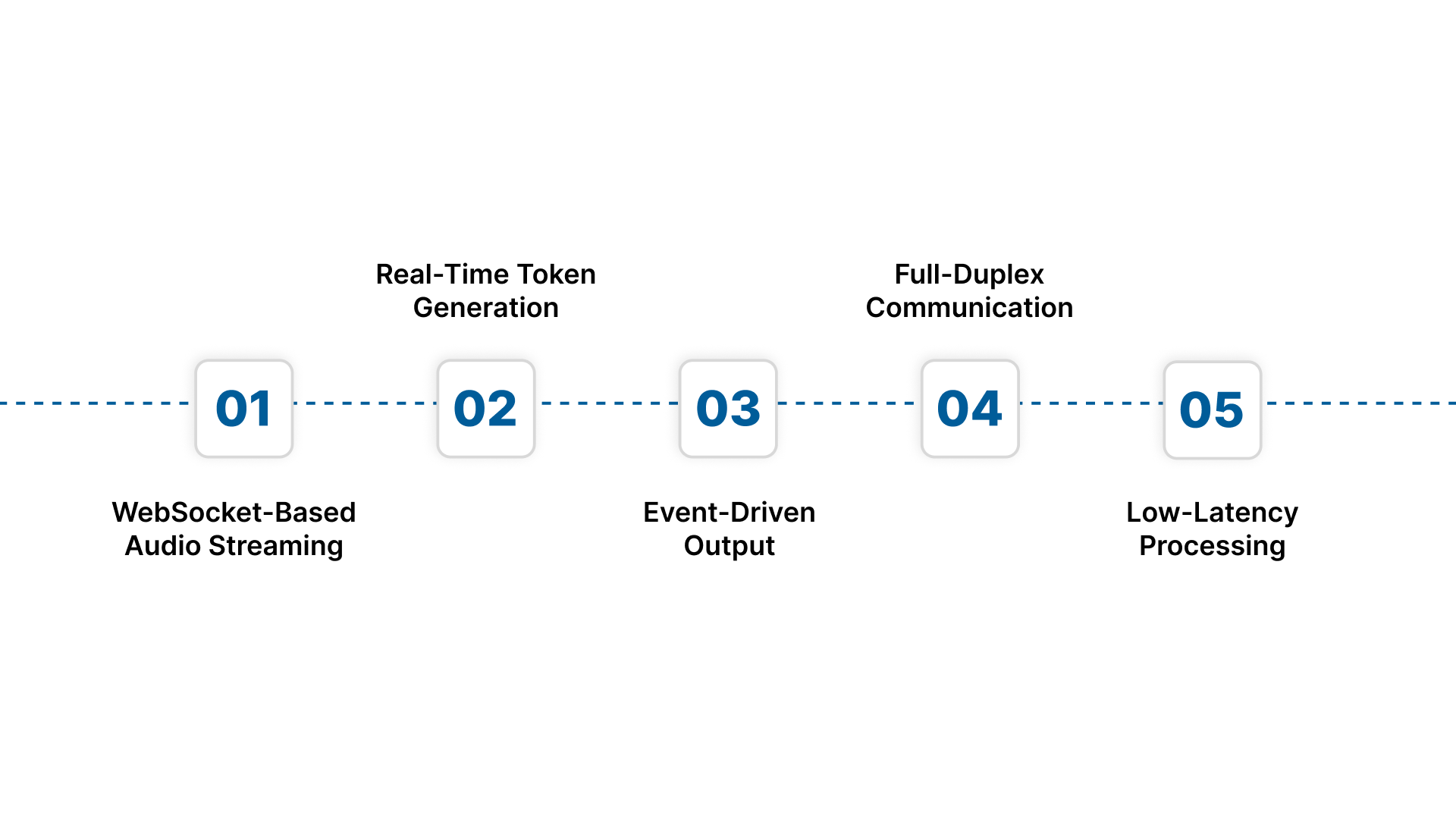
The Realtime API follows a structured process for converting audio streams into text. Here’s how that pipeline works.
1. WebSocket-Based Audio Streaming
The API uses a WebSocket connection to receive audio in small chunks. As your application streams audio frames, the model begins processing them immediately.
2. Real-Time Token Generation
Instead of waiting for the speaker to finish, the model generates partial transcripts as it listens. These partial outputs get refined as more audio arrives.
3. Event-Driven Output
The API sends back different types of events, such as:
- partial transcripts
- updated transcripts
- finalised text
This structure helps developers sync transcription with UI or automation workflows.
4. Full-Duplex Communication
Your app can send audio while receiving transcripts at the same time. This enables smooth, conversational interactions without noticeable pauses.
5. Low-Latency Processing
Latency is kept low by design. The model processes audio in near real time, allowing immediate display or downstream use of transcripts.
Also read: 5 Key Uses of Speech-to-Text Transcription in Business
Setting Up Realtime Transcription With the OpenAI API
Implementing OpenAI’s Realtime API requires a streaming setup rather than a simple REST call. Here’s how the workflow typically comes together in real products:
1. Establish a Persistent WebSocket Connection
Your application first opens a WebSocket connection to the Realtime API endpoint. This connection stays active throughout the session and serves two purposes at the same time:
- Sending audio frames in
- Receiving events out
Most teams run this connection inside a browser client, mobile SDK or backend service for telephony/IVR routing.
Example: Creating a Basic Realtime Session
| // Create a realtime transcription session
const ws = new WebSocket( “wss://api.openai.com/v1/realtime?model=gpt-4o-transcribe”, { headers: { Authorization: ); ws.onopen = () => { ws.send(JSON.stringify({ type: “session.create”, audio: { input: { format: “pcm16” } } })); }; // Listen for transcription events ws.onmessage = (event) => { const data = JSON.parse(event.data); if (data.type === “conversation.item.input_audio_transcription.delta“) { console.log(“Partial:”, data.delta); } }; |
This snippet shows the two core steps of real-time transcription:
- Opening a session
- Receiving incremental transcription events
2. Capture and Encode Audio in Real Time
The client must capture microphone input and convert it into the required audio format (usually 16 kHz, PCM, 16-bit). This involves:
- Accessing the device microphone
- Chunking audio into small frames (10–50 ms)
- Encoding each frame appropriately
- Ensuring minimal delay between capture → send
This part is typically where engineering complexity begins.
3. Stream Audio Frames Continuously
Once audio is captured and encoded, it is streamed over WebSockets as the user speaks. Your application controls:
- How frequently frames are sent
- How large each frame is
- How audio gaps and silence are handled
- When to stop or reset the stream
The Realtime API starts processing as soon as frames arrive.
4. Listen for Event-Based Outputs
The API sends a series of events that evolve as transcription progresses:
- Partial text (initial guess)
- Updated text (refined version)
- Final text (locked output)
Your system must listen to these events and handle them correctly.
Typical uses include:
- Updating an on-screen transcript
- Triggering logic when a phrase appears
- Syncing output with other UI elements
5. Handle Conversation State and Model Responses
Because the Realtime API also generates responses (not just transcripts), your app must manage:
- Conversation memory
- Model output routing
- When to speak back to the user
- When to pause, resume or interrupt the model
Teams often implement a state manager to coordinate transcription + model responses.
6. Close, Reset or Restart the Session
When the interaction ends, you close the WebSocket session and finalise the transcript.
Depending on your product design, you may also:
- Store the transcript
- Process analytics
- Send events downstream
- Start a new session for the next user
7. Optional: Add a TTS Output Layer
If your application needs voice responses, you can also generate audio via TTS and play it back to users.
In most real-time applications, this creates a closed loop:
User speaks → API listens → API responds → App speaks back
Limitations of the Realtime API for Indian Enterprise Use Cases
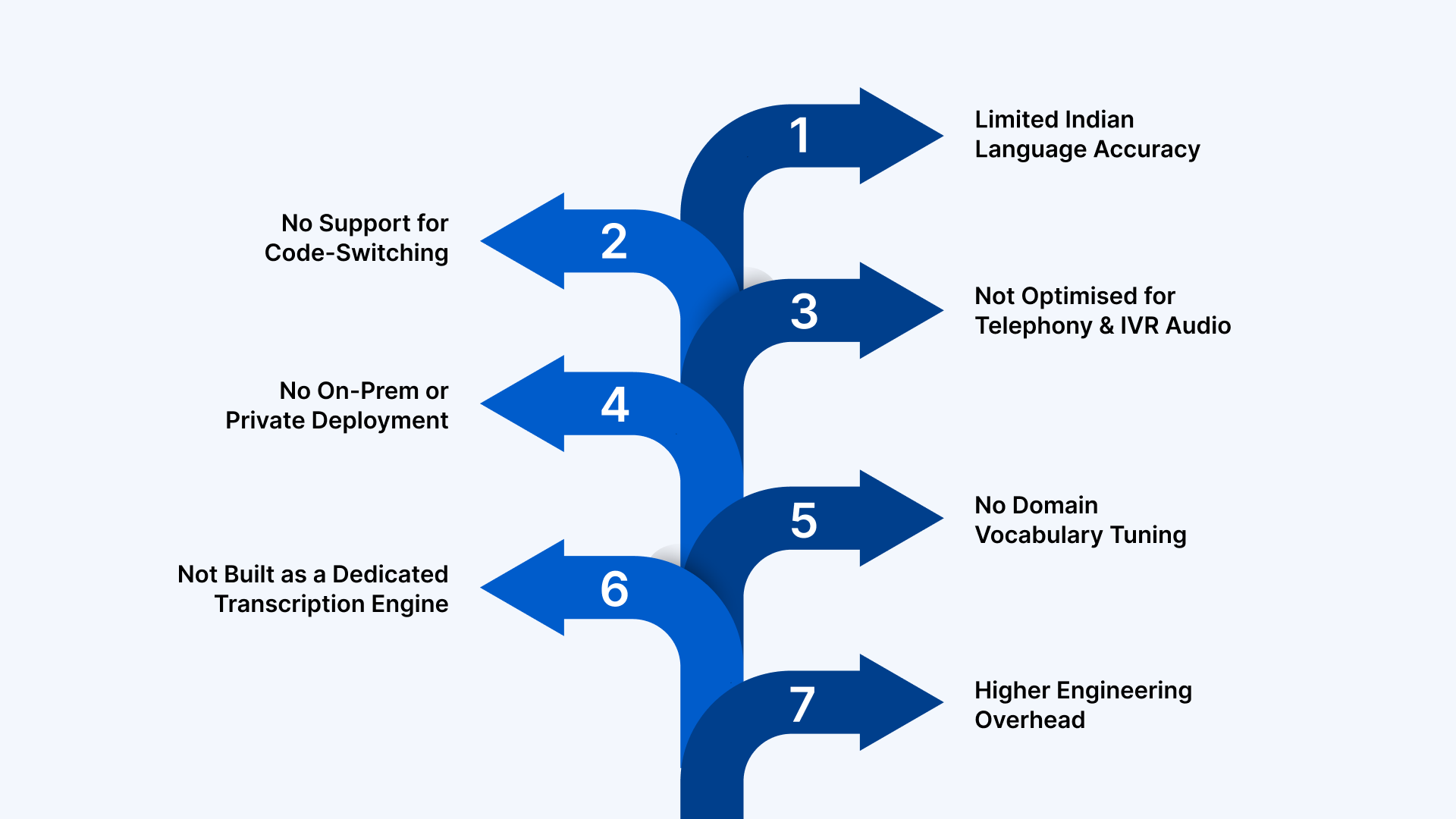
OpenAI’s Realtime API is strong for general conversational AI. But Indian enterprises work with multilingual users, noisy audio and strict compliance needs. These are areas where the Realtime API has clear gaps.
1. Limited Indian Language Accuracy
The Realtime API is trained mainly on global English-first datasets. It does not optimise for Hindi, Telugu, Tamil, Bengali or other Indian languages. Accuracy drops sharply for regional dialects and native phonetic patterns, which dominate customer calls and field interactions.
2. No Support for Code-Switching
Indian users switch languages mid-sentence. Hinglish, Tamlish and Benglish are common across support calls, sales interactions and IVR journeys.
The Realtime API processes languages separately, so transcripts lose context when the speaker moves between languages.
3. Not Optimised for Telephony and IVR Audio
Most Indian enterprises rely on:
- Call centre recordings
- Telephony-grade audio
- WhatsApp voice notes
- IVR interactions
These audio sources contain noise, compression and uneven volume. The Realtime API performs best with clean, near-field audio, so quality varies unpredictably in real customer environments.
4. No On-Prem or Private Deployment
Banks, insurers, NBFCs, healthcare providers and government teams require:
- Strict data residency
- VPC deployment
- Isolated infrastructure
- Compliance with internal IT policies
The Realtime API is cloud-only. This immediately rules out adoption for regulated or sensitive workflows.
5. No Domain Vocabulary Tuning
Indian enterprises use industry-specific terms in:
- BFSI (KYC, loan types, policy codes)
- Healthcare (clinical terms, medicines, diagnostics)
- Automotive (part names, model variants)
- Public services (scheme names, regional identifiers)
Without domain adaptation, transcription errors increase and downstream automation breaks.
6. Not Built as a Dedicated Transcription Engine
The Realtime API is built for voice assistants and conversational agents. Enterprises need structured output like:
- Speaker labels
- Timestamps
- Punctuation stability
- Multi-channel audio
- Clean formatting
These features are not the primary focus of the Realtime design.
7. Higher Engineering Overhead
Teams must handle audio capture, buffering, VAD settings, event routing and reconnection logic. This increases engineering effort in environments where teams want predictable, plug-and-play transcription.
These limitations matter when your workflows involve Indian languages, complex audio and enterprise-scale requirements. This is exactly the gap Reverie was built to solve.
Also read: 10 Best Speech-to-Text APIs for Real-Time Transcription
Reverie’s Speech-to-Text API for Indian Enterprise Workflows
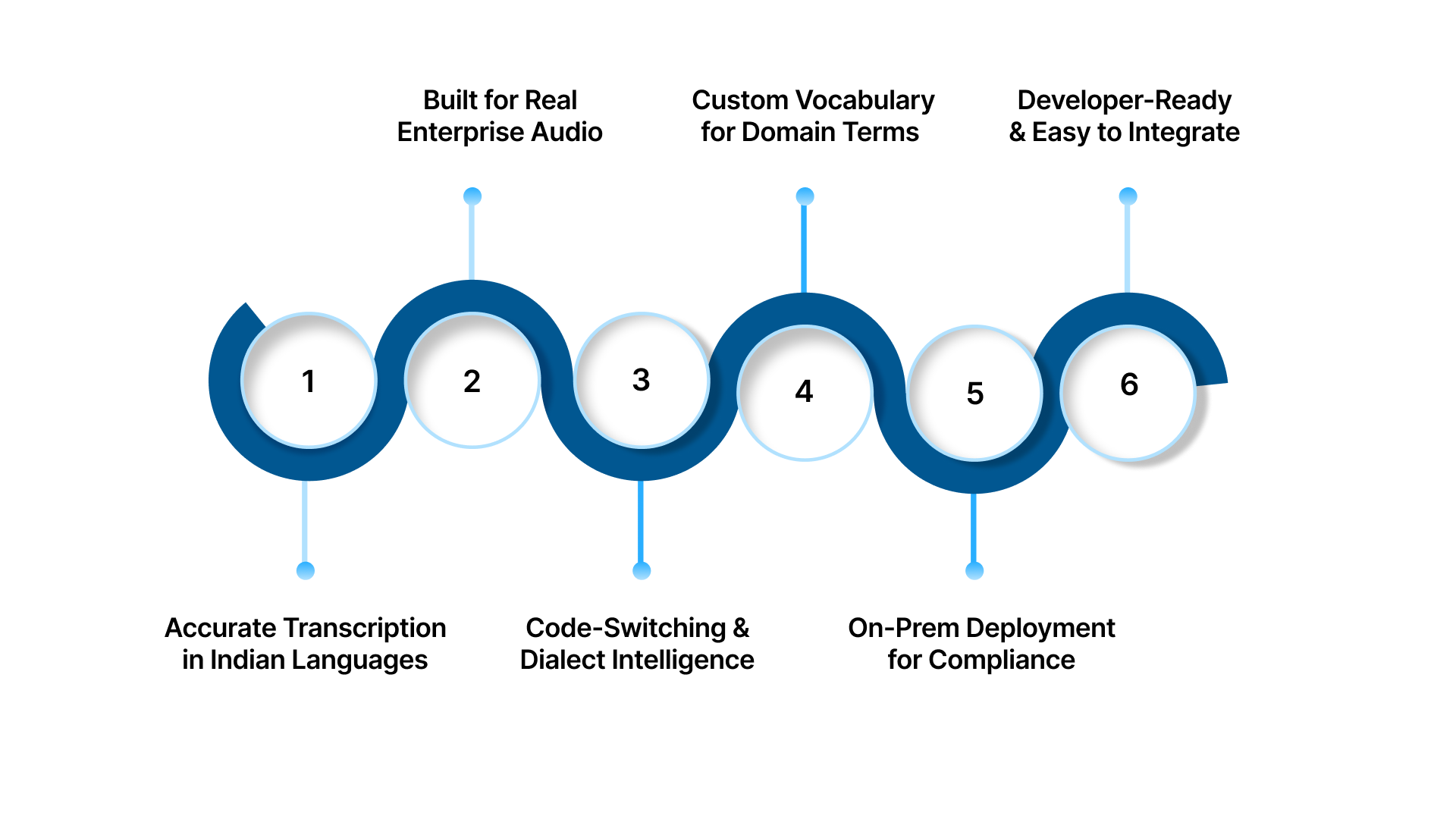
For teams working across India’s multilingual and high-volume environments, Reverie’s Speech-to-Text API delivers what general-purpose speech models cannot: consistent accuracy, Indian-language intelligence and enterprise-ready deployment.
Enterprises using Reverie have reported a 37% increase in sales, a 2.5x rise in lead generation and a 62% drop in operational costs.
The Speech-to-Text API supports 11 Indian languages and works smoothly with calls, meetings, IVR lines and field recordings. It is tuned for regional pronunciation and code-switching, ensuring stable transcripts even in noisy, real-world environments.
Key features:
1. Accurate Transcription Across Indian Languages
Reverie is trained on large-scale Indian speech datasets across Hindi, Tamil, Telugu, Bengali, Kannada, Odia, Punjabi, Gujarati, Malayalam, Marathi and English. This delivers high accuracy in real customer conversations, not just clean benchmark audio.
2. Built for Real Enterprise Audio
Enterprise audio often comes from call centres, telephony networks, IVR flows, WhatsApp recordings and field interactions. Reverie handles noise, compression artefacts and low-bitrate signals with stability.
3. Code-Switching and Dialect Intelligence
Hinglish, Tamlish, Benglish and other mixed-language patterns are supported natively. The engine maintains context even when speakers switch languages mid-sentence.
4. Custom Vocabulary for Domain Terms
Sectors like BFSI, healthcare, automotive and education rely on specialised terminology. Reverie supports domain vocabulary customisation to improve accuracy for medical terms, financial products, policy codes, model variants and industry-specific keywords.
5. Cloud or On-Prem Deployment for Compliance
Reverie offers SaaS, VPC and fully on-premise deployment options. This is essential for banks, insurers, government bodies and healthcare organisations with strict data governance requirements.
6. Developer-Ready and Easy to Integrate
Reverie provides SDKs and sample code for Android, iOS, Web, Python, NodeJS and REST. Teams can test and deploy quickly using the RevUp API Playground, quick onboarding flows and real-time usage analytics.
Wrapping Up
Real-time transcription is now a core layer in modern workflows, from customer support to IVR to conversational AI. OpenAI’s Realtime API makes it easy to prototype fast, speech-enabled experiences, especially in clean-audio environments. But Indian businesses work with noisy call data, mixed languages and strict compliance needs. That requires a transcription engine tuned for real accents, real dialects and real enterprise constraints.
Reverie’s Speech-to-Text API is built for these conditions. It delivers accurate multilingual transcription across 11 Indian languages, handles code-switching, supports telephony audio and offers cloud or on-prem deployment for regulated sectors. It turns everyday voice data into structured, usable text for analytics and automation.
Sign up now to see real-world performance.
FAQs
1. How do you transcribe audio in real time?
You stream audio through a WebSocket connection to a real-time ASR or AI model. The model returns partial and final text events as the user speaks.
2. Is the Realtime API free?
OpenAI offers limited free credits. Beyond that, usage is billed based on model type and audio duration. Always check the latest pricing before deploying at scale.
3. What is the GPT Realtime API?
The GPT Realtime API is OpenAI’s low-latency streaming interface that processes audio, text and events in real time. It powers voice agents and can also provide live transcription.
4. Can OpenAI transcribe audio live?
Yes. The Realtime API can stream audio and return partial and final transcripts as the user speaks. It works through persistent WebSocket or WebRTC connections.
5. Does Realtime API support on-prem deployment?
No. It runs only on OpenAI’s cloud. Enterprises requiring private, VPC or on-prem setups need dedicated ASR solutions.

